Release tool for Flutter apps
Ship your Flutter apps to the App Store and Google Play from your own Mac
XPath is a self-hosted, open source release tool for Flutter apps. It builds, signs, uploads, tags and tracks your iOS and Android releases from your Mac or your own Linux box, with a Mac app, a command line, an MCP server for agents and remote runners.
An agent can start a release. Only you can approve it.

What it is
What is XPath?
XPath is a release tool for Flutter apps that you run yourself. You point it at a GitHub repository; it scans the app's flavors, bundle IDs and signing setup without writing to your folder, then builds, tests, signs and uploads releases to App Store Connect, Google Play, Firebase App Distribution and Shorebird. It tags each release, opens the release pull request, follows each store's review until the build is live, and merges once both stores have it.
A headless engine, xpd, does the work and keeps the secrets. Four clients talk to it: the macOS app, the xp command line, xp mcp for AI agents, and xp runner on other Macs and Linux machines. XPath is free and licensed under Apache-2.0. It is not related to XPath, the XML query language.
Who it is for
For Flutter developers who already release from a Mac
You ship a Flutter app to both stores
Today that means Xcode's Organizer, the Play Console, a version bump by hand and a script only you can run. XPath turns that into one dispatch with the same steps every time.
Your signing keys should stay on your machine
Keystores, App Store Connect keys and Play service accounts live in your Keychain or an encrypted file on the machine that runs the engine. Nothing is uploaded to a build service.
You let a coding agent work in the repo
The agent can dispatch builds, read logs and edit workflows through
xp mcp. It cannot approve a production release, a push or a merge.Not a fit if you have no Mac
iOS builds and App Store uploads need a Mac with Xcode. If you have no Mac, or you want build capacity someone else maintains, a hosted CI fits better. See XPath vs Codemagic.
How a release flows
One production release, start to merge
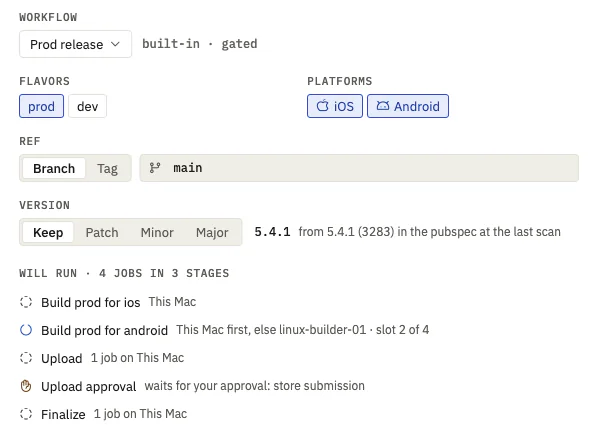
The built-in prod-release workflow runs these stages in order. Steps that push, upload or talk to GitHub run on the engine; the build can go to any paired runner with the right tools. A stage marked you approve waits for you.
-
Dispatch
Pick the app, flavors, platforms and version bump. XPath previews every job, the machine it lands on and the approvals it will stop at, then allocates the build number once: higher than anything in the stores, the tags or its own counter, and never reused.
-
Prepare you approve
Bumps the version in
pubspec.yamland the plists, cutsrelease/5.4.1and pushes it. The cut and the push each wait for your approval. -
Check
Guards fail early with a fix: version files in sync, build number not used before, credentials valid, the App Store version train still open, Play's target API level.
-
Build
flutter buildorshorebird releasewith the Flutter version the app pins in.fvmrc, then the symbols and a manifest with the SHA-256 of every artifact.This Mac, or a paired runner
-
Upload
App Store Connect, Google Play and Firebase App Distribution, for the stores the flavor has credentials for. An upload that Apple rejected after altool exited 0 still fails the step.
-
Finalize
Tags
v5.4.1+3283, pushes the tag and opens the release pull request. -
Stores
XPath asks each store for its status at most every ten minutes: uploaded, in review, approved, live. A rejection gets "New build, same version" with the next build number.
-
Merge you approve
Once every store it targets is live, the release branch can merge into
mainwith a merge commit, of exactly the commit that was tagged.

What it does
What XPath handles for you
Scan
Reads the repository as text, with no tool installed and no write: apps in a monorepo, flavors from Gradle, Xcode schemes and
flavorizr.yaml, bundle IDs, signing team, Shorebird app IDs, the.fvmrcpin. Problems come back as findings with a fix, such as an iOS bundle ID one character away from the Android one.Builds
Each app builds with the Flutter version it pins, through fvm or XPath's own cache. A build only takes files written after it started, so a stale APK from an earlier run is never uploaded. Artifacts are kept with their SHA-256 until housekeeping frees the space.
Stores
App Store Connect with an API key or an Apple ID, Google Play with a service account, Firebase App Distribution with no Node and no Firebase CLI. Each credential is checked with the service before it is saved, every day after, and again before a build.
Shorebird
Releases and patches. A patch builds with the Flutter version the release was built with, not the app's current pin.
Tests
flutter testandflutter analyzeas steps. A test run fails only on new failures against the last green run of the base branch, so the failures you already know about do not block a release.Workflows
YAML documents with stages, a platform and flavor matrix, conditions and approval gates, edited in a visual builder or as text. Validation points at the line and column; every save is a new version, and each job records the version it ran.
Runners
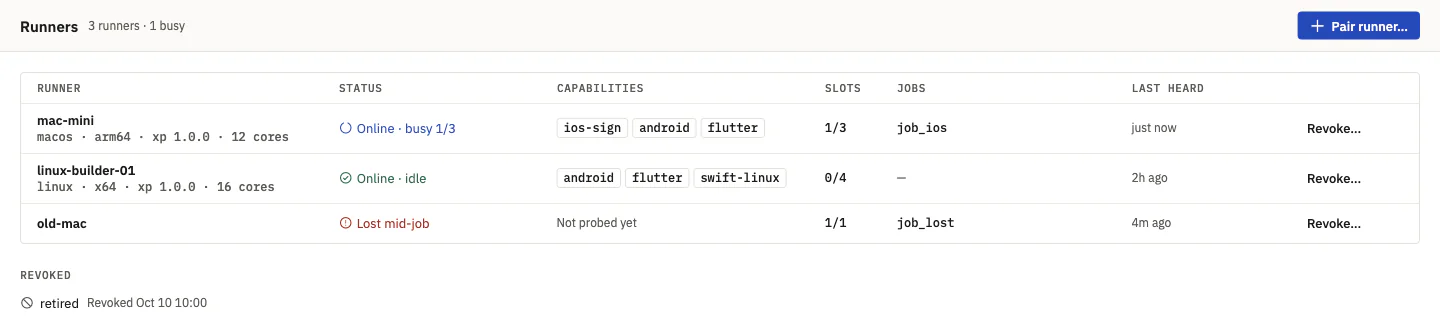
Pair another Mac for iOS or a Linux box for Android with a one-time token. Runners dial out to the engine, so nothing connects to them, and they take jobs that fit their tools and free slots.
Releases
An App Store lane and a Play lane, a timeline, release notes grouped by commit type with "Copy for Slack" and "Copy for WhatsApp", and a reminder about
min_versionflags once a store is live.Notifications
macOS notifications and a menu bar item when something waits for you; an optional Slack webhook per project, masked like the logs.
Clients
The Mac app, the
xpcommand line with--jsonon every command,xp mcpfor agents, and a Docker image for the engine on a server.


Safety
Your keys stay on your machine. Agents can't approve.
Secrets
- On macOS, secrets live in your login Keychain; large ones such as keystores go to a file encrypted with a key kept in the Keychain. On Linux, an XChaCha20-Poly1305 encrypted file.
- Every log line is masked against the secrets the engine knows. Secrets never go on a command line and the API never returns one once it is saved.
- A runner gets the keystore or the Shorebird key only for the job it leased, once per key, and wipes it when the job ends. The GitHub token and store credentials never leave the engine.
- XPath writes nothing to your repository except the release commits, branch and tag. No telemetry: the daily update check is one anonymous request to GitHub's release list, and
XP_NO_UPDATE_CHECK=1turns it off.
Approvals
- Each device gets its own token, stored as a SHA-256 hash:
app,cli,mcporrunner. Onlyappandclitokens approve. xp mcphas no tool to approve, deny, merge or change a gate, and the engine answers403to anmcptoken that tries.- An approval is bound to the project, the commit and the version. If any of them changes it no longer counts, and one nobody decides expires after 24 hours.
- In the app, Return never approves. Approve takes ⌘ Return after a one-second delay, from a sheet that says what happens if you approve.
Found a security problem? Report it privately, as SECURITY.md describes.
Agents
Let your coding agent run the release, up to the gate
xp mcp is an MCP server for agents such as Claude Code. It can list projects, read runs, jobs, log tails, test results and store status, validate and save workflows, and dispatch them. When a production release reaches a gate, the run waits; the agent tells you, you approve in the app or with xp approvals approve, and the agent carries on.
claude mcp add xpath -- xp mcpAgent skills teach Claude Code, Cursor, Codex and other agents how to release with XPath, write workflows, set it up and change it. Install them from the repository of the app the agent will release:
npx skills add AbdurahmanAlmehdi/x-pathInstall
Install XPath
Mac app
Download XPath-<version>.dmg from the latest release. It is signed with Developer ID and notarized by Apple, for Apple silicon Macs. The app carries the engine and the xp command. On first launch it starts the engine as a login item, links xp into your PATH and checks for Xcode, git, fvm, gh and Shorebird.
You need Xcode, git and the Flutter toolchain your apps use. Shorebird only for over-the-air patches.
Linux
The engine and the command line for x64 and arm64. The script downloads the latest release, checks its SHA-256, installs into ~/.local and, where systemd runs a user session, starts xpd as a user service. Run it again to update.
curl -fsSL https://xpath.abdurahman.ly/install | shA machine that only runs jobs for an engine elsewhere:
curl -fsSL https://xpath.abdurahman.ly/install | sh -s -- --runnerDocker
The engine for linux/amd64 and linux/arm64. The image has no Flutter: builds go to paired runners.
docker run -d --name xpath -p 127.0.0.1:7480:7480 \
  -v xpath-data:/data ghcr.io/abdurahmanalmehdi/xpath:latest
docker exec xpath xpd token create --name laptop --kind cli
Then
- Connect GitHub: paste a token or import it from the GitHub CLI.
- Add a project by its folder or
owner/name, and review the scan. - Add credentials per flavor. Each is checked before it is saved.
- Dispatch a dev build.
The README covers every option, the API and the workflow format.
Questions
Questions people ask
Does XPath need a Mac?
For iOS, yes. iOS builds need a Mac with Xcode, and App Store uploads run on the engine, so the engine must run on a Mac to ship to the App Store. An engine on Linux or in Docker can build and ship Android, and can send iOS builds to a paired Mac runner.
How much does XPath cost?
Nothing. XPath is open source under Apache-2.0. You run it on hardware you already have, and you still need your own Apple Developer and Google Play developer accounts.
Is XPath a CI service?
No. It is software you install, and it runs only on your machines. It is narrower than a general CI: it does Flutter releases, from version bump and build to store review and merge.
Does my app's repository need changes?
No. XPath reads your repository and keeps its own mirror to build from. It writes only the release commit, branch, tag and pull request that a production release makes.
Who makes XPath?
Abdurahman Almehdi, who built it to ship his own Flutter apps. Contributions are welcome under the rules in CONTRIBUTING.md.